Showing posts with label an. Show all posts
Showing posts with label an. Show all posts
Monday, September 29, 2014
HOW TO CREATE AN ADVERTISMENT POSTER IN MS WORD
MICROSOFT WORD DRAWING PROJECT No. 26
TITLE: HOW TO CREATE AN ADVERTISMENT POSTER IN MS WORD
TYPE: GRAPHIC DESIGN
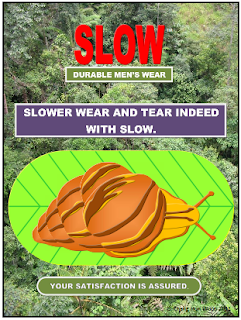
After creating the snail and the leaf, the next thing I did was to use them to create an advertisement poster for a clothing company that produces men’s wear. The brand name “SLOW” is associated with the image of the snail to highlight the concept of slower wear and tear which symbolises durable and quality products. To further emphasis the concept of durability, I used the picture of the tropical forest for the design’s background. Don’t you think that this idea will be quite convincing if these clothes can be worn for jungle trekking and camping?
Art Education teachers can create graphic designs like this to teach Basic Design or Visual Art theories. The two main basic components in Basic Design are known as Elements of Art and Principles of Design. The elements of art which are present in the poster design below are as follows - LINE, COLOUR, TEXTURE, FORM and SPACE.
The principles of design found in the design as mentioned are as follows - BALANCE (Symmetrical Balance which is also known as Formal Balance as well as Proportion), HARMONY , CONTRAST, DOMINANCE and of course UNITY.
Actually, the elements of art are the basic ingredients or building blocks needed to create works of art. It is the principles of design that guide the use of these elements to achieve unity in design which is the prime objective of every work of art. In other words, the principle of unity is the determining factor in the quality of a work of art.
Furthermore, a good poster should be simple but at the same time able to captivate viewers. It should also be able to convey the message or information to viewers in matter of seconds or at a glance. Let’s say, if people are driving on the highway, wouldn’t it be dangerous if they spend a long time looking at the billboards trying to figure out the messages or information that the advertisers try to convey? Therefore, posters or advertisements should be clear in their objectives, have clear and bold sans serif typeface such as block letters or Arial Black font, and relevant illustrations or images that are not too distracting. I prefer sans serif typeface or block letters in my graphic designs because they are easy to read.
The principle of contrast in the poster below is demonstrated with the juxtaposition of the lighter coloured text with the darker background. This makes the text stands out clearly. And finally, to create this poster, just copy the pictures into the photographed background and then create the text using the Text Box tool. In fact, you can also insert text created by WordArt such as the brand name “SLOW” into the Text Box so that the text can be moved around. For MS Word 2007 users, try using Shadow Style18 to create the emboss effect on WordArt text.

Original Picture of Tropical Forest

Picture of Tropical Forest Cropped with Paint Program
THE COMPLETED ADVERTISMENT POSTER DESIGN

Zip Repair or RAR File Repair Solution for an Error “This is not a valid win32 application”
WinZip and WinRAR are the most important and widely used software to compress file. These tools have excellent compression capabilities due to this WinZip and WinRar are most in the demand from all over the Globe. Once we compress the files then we can get more storage space in the hard disk. User can send large files as attachment through email very easily after compressing the large file with WinZip and WinRAR tools. But sometimes these compressed files get corrupt due to several reasons and users get few errors while accessing compressed .zip or .RAR files. To repair these corrupted Zip files it is important to use Zip Repair tools.
Cause: There are several reasons due to which compressed files (.zip or .rar) may get corrupt few are as follows:
- Due to virus attack
- Improper System Shutdown
- Improper Download etc.
If zip files affected by any of above written reason then it is possible to face these written errors.
- "Cannot open file: it does not appear to be a valid archive"
- "This is not a valid win32 application or Corrupt Zip file"
- "CRC Errors"
Solution: To solve above written errors user can try Inbuild Repair Utility of WinRAR. But this repair utility works when compressed file is not heavily damaged.
Here I am sharing few important steps to repair .ZIP/.RAR files using WinRAR:
- Open WinRAR and browse to the folder with your .rar/.zip file.
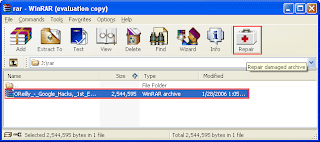
- Highlight the file and click the Repair button from the tool bar.
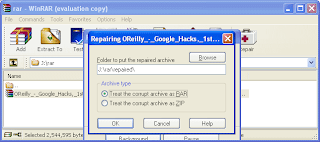
- Now a popup windows will appear which have two options, select “Treat the corrupt archive as ZIP" or “Treat the corrupt archive as RAR” depending which type of archive you want to repair.
- You may get a "Suspicious Entry" pop-up. If so, select all. This may happen several times while repairing.
- Click on Close, after WinRAR has completed repairing the archive.
- To extract your file, highlight your new rebuilt archive.
- Next select Commands > Extract without confirmation
- The files will start extracting.
- The archived files will be extracted to the specified folder as the repaired archive.
HOW TO DRAW AN APPLE IN MS WORD PART 1
MICROSOFT WORD DRAWING PROJECT No. 36
TITLE: HOW TO DRAW AN APPLE IN MS WORD PART 1
TYPE: DIGITAL DRAWING
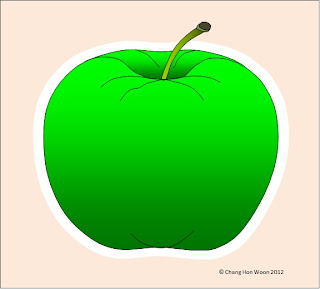
This delicious looking green apple was drawn with the Curve line tool. The drawing was then filled with Gradient effects to enhance its appearance. This drawing shows the front view of the apple. It has been a known fact that eating green apples can keep you healthy. Its sugar content is lower too. Why don’t you try creating a graphic design for the apron by using apple as the subject matter?
Sunday, September 28, 2014
How To Turn on Parental Controls on an iOS Device
The iPhone, iPad and iPod Touch are great resources for many children and adults alike. If you want more control over what your child is doing while using their iOS device restrictions is the place to go. To enable restrictions go to settings then general and then restrictions. From there you will have to set a password so no one else can change the settings. You will want to make sure that you remember the password. Once you have typed in your password you can block access to different features such as the internet, downloading apps, deleting app, FaceTime, camera and more. These built in options are great for parents and educators who want more control over what children are doing on their iOS device.
To learn more and see step by step instructions watch the video above.
Subscribe to:
Posts (Atom)