Showing posts with label website. Show all posts
Showing posts with label website. Show all posts
Saturday, October 18, 2014
Blog Vs Website The Basic Difference
Have you ever thought about the difference between a website and blog? Or do you know what they actually are? Few hours ago I was thinking about the difference between a blog and website. To be honest I had no clear idea about this issue. So I searched it on Google, visited 3/4 sites and got a clear idea. Now I am gonna share my knowledge with you.
You may think that a blog something which is created either by WordPress, Blogger, TypePad or something like that where the coding knowledge is not essential. And about a website your opinion may be just opposite. Actually youre 50% correct. Lets find out the fact below:
What is a blog actually?
In fact a blog is a type of website. But it is different from a complete website in following aspects:
- The contents of a blog are updated regularly. Posts are generally current and informative.
- Normally a blog is an informal way to communicate with the audience. It is interactive in nature. Visitors can express their opinion and communicate with the owners or other visitors.
- Anyone may have a blog whether it is an organization or individual.
- Blog is considered as Digital Magazine as the recent contents are shown at the top.
- A blog has a definite layout and shape. It is not as flexible as website. But you can easily change the design and layout just by using a different template!
- You dont need to be an expert to maintain a blog.
Most of the famous organizations have their official blogs. Even Google, Microsoft, Twitter use blog to communicate with their consumers. As the contents of blogs are regularly updated with fresh topics, they can easily get higher rank in the search engines. An organization usually publishes new offers, news updates, notices for the customers through blog.
An individual may also have a blog. A personal blog may be created by Bloggers, WordPress etc. Personal opinions, experience can be shared by these types of blogs.
What is a Website?
A website is normally owned by an organization that contains the information about products and services of that organization. Normally a website doesnt publish new posts like a blog. Rather it adds data to the pages. To have a clear idea please look at the points below:
- Normally a website is more versatile and flexible than a blog.
- Coding knowledge is crucial for developing a website. As it is coded by a trained developer, the website can be customized according to the requirements.
- Interactivity doesnt exits in a website usually. Because most of the websites excludes comment option.
- It is a formal way of communication about products and services.
A website is a perfect way to present the organization in the web. Consumers can easily surf the site and get required information from it. Some companies also sale their products using their websites. Companies like Apple, Microsoft sell their products online. You know about online sales sites like Amazon.com, eBay etc. take orders from their customer by their websites.
By this time you should know both blogs and websites have some advantages and disadvantages. As a result many websites are now developed including the features of a blog. Specially WordPress provides such an excellent facility. Many websites are now developed by WordPress due its high customization opportunities. WordPress let you easily customize the contents of the site. A website developed by WordPress has the advantages like a blog too!
The last thing I would like to say - A blog is a type of website! Thats it :)
Stay with Marks PC Solution to get more interesting IT topics!

Tuesday, September 30, 2014
Alexa Website Review Feature has been Stopped !!
Marks PC Solution has published many posts on Alexa so far. Basically those posts are about alexa tips. But this time youre not getting any tip on alexa. This could be an important news that may affect the alexa ranking of your site.
In December 2012, I wrote a post named - Place Alexa Review Widget & Boost Your Alexa Ranking!. And it was really an awesome trick to boost that time. Have you noticed that I use the past form? Why?
Because the review feature is no longer available. Its been stopped using by Alexa. Few days ago, I created an account on Alexa to write a review for a site. But when I had visited the review link it showed -
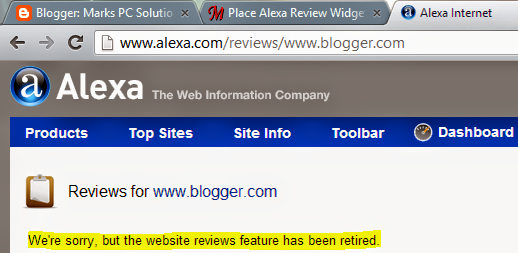
Those of you are not familiar with this feature should read this post. Alexa review system was a great trick to improve the Alexa rank. Marks PC Solution had more than 100 reviews on Alexa and these helped a lot to take the rank below 100000.
Though Alexa Rank is reliable after Google Page Rank, it has some criticisms. Such as -
These are the key reasons for what Alexa has stopped their review system. Besides Alexa Review system had some limitations too. One can write a review using his email. And if that email ID has Facebook account, then another review can be written using that FB ID. Sometimes a person couldnt find a proper category for the reviewed site. Then he needs to choose others category.
Sometimes site owners create multiple account on Alexa. And they write multiple reviews for their own sites which is not legal. But Alexa can hardly detect the cheating. And those sites get higher ranking.
There is another problem. Established websites and blogs are hardly interested to Alexa Ranking. They never focus on what happened to Alexa rank of their sites. Often we see the giant sites have only a few number of reviews on Alexa. Where the poor sites have many reviews which are suspicious. Considering these controversial issues, the Reviews Feature has been stopped by Alexa.
When the Reviews feature was active, Alexa toolbar used to show the number of reviews for a website. But now this button has been removed from Alexa Toolbar too.
Will this Affect Current Alexa Rank?
Simply I dont know! I tried to find the details, why Alexa stops this. But cant manage sufficient information. I searched Alexa for clues. But there was nothing about it. If you get any link you can share in the comment box.
Maybe the sites, which were only improved by fake positive reviews on Alexa, maybe affected. Hopefully Marks PC Solution has no such problem. Our current ranking is as below:
In December 2012, I wrote a post named - Place Alexa Review Widget & Boost Your Alexa Ranking!. And it was really an awesome trick to boost that time. Have you noticed that I use the past form? Why?
Because the review feature is no longer available. Its been stopped using by Alexa. Few days ago, I created an account on Alexa to write a review for a site. But when I had visited the review link it showed -
Those of you are not familiar with this feature should read this post. Alexa review system was a great trick to improve the Alexa rank. Marks PC Solution had more than 100 reviews on Alexa and these helped a lot to take the rank below 100000.
Though Alexa Rank is reliable after Google Page Rank, it has some criticisms. Such as -
- Alexa Traffic Widgets
- Alexa Toolbar
- Alexa Reviews Feature and Review Widget
- Posts on Alexa
When your website or blog includes the listed bribes, it will be able to capture a better position on Alexa Rank. In a word, if your site has affiliation with Alexa, they will give you a better rank! Maybe, Alexa is trying to minimize the criticisms. As a part of the initiative, theyve stopped the review feature. Review feature was quite useful. But maybe Alexa failed to use it properly. Ive also noticed some misuse of Alexa Review. Such as -
- Fake and Inappropriate Review
- Writing Review using Multiple Accounts
- Inability of Alexa to Evaluate the Reviews
- Exchange of Money to Write Positive Reviews
These are the key reasons for what Alexa has stopped their review system. Besides Alexa Review system had some limitations too. One can write a review using his email. And if that email ID has Facebook account, then another review can be written using that FB ID. Sometimes a person couldnt find a proper category for the reviewed site. Then he needs to choose others category.
Sometimes site owners create multiple account on Alexa. And they write multiple reviews for their own sites which is not legal. But Alexa can hardly detect the cheating. And those sites get higher ranking.
There is another problem. Established websites and blogs are hardly interested to Alexa Ranking. They never focus on what happened to Alexa rank of their sites. Often we see the giant sites have only a few number of reviews on Alexa. Where the poor sites have many reviews which are suspicious. Considering these controversial issues, the Reviews Feature has been stopped by Alexa.
When the Reviews feature was active, Alexa toolbar used to show the number of reviews for a website. But now this button has been removed from Alexa Toolbar too.
Will this Affect Current Alexa Rank?
Simply I dont know! I tried to find the details, why Alexa stops this. But cant manage sufficient information. I searched Alexa for clues. But there was nothing about it. If you get any link you can share in the comment box.
Maybe the sites, which were only improved by fake positive reviews on Alexa, maybe affected. Hopefully Marks PC Solution has no such problem. Our current ranking is as below:
Youre requested to share any information related to the Alexa Reviews Feature. Thanks . . .
Stay with Marks PC Solution to get more interesting IT topics!
Sunday, September 28, 2014
How to Create a Custom Toolbar for Website
A customized toolbar of your blog or website may increase visitors loyalty. If they found your toolbar useful they can use it in browser. And this is also important for your sites ranking. There may be hundred ways to build a toolbar. Some of them are free or some may be premium.
For creating toolbar, my personal choice is Alexa. Why?
- Because its free and easy to use.
- You can easily monitor the usage statistics.
- And most importantly, alexa is a ranking site. It measures websites ranking from 1 to the last.
- Alexa considers the site most that has its toolbar and widget in the page.
Lets build a toolbar now.
1. First go to the Alexa and register an account. It takes 2 or 3 minutes. If you already have
an account then proceed to the next step.
an account then proceed to the next step.
2. Now go to the toolbar creator page.
3. A pop up window will ask you to enter the toolbar name. Type the name or skip it.
You can write a name later.
You can write a name later.

4. Now look at the image below. Here you can edit toolbar name and choose a logo.

5. Have a look at the Add buttons that drive traffic to your website. There are 4 buttons.
Only add the buttons that is necessary for you. Because you cant add
all the buttons due to the space limitations.
6. Now move to the Add social networking buttons section. Add only the first 2 buttons.
Show tweets button is not necessary. Click Next.
7. Add buttons for things that your users do everyday. This is the most useful part for
the users. I recommend you to add the Personal Twitter and Gmail button. Click Next.
the users. I recommend you to add the Personal Twitter and Gmail button. Click Next.
8. This step let you add an icon for the toolbar. You can either choose an icon made earlier
or use the default. I prefer to use the custom image. Click Next.
or use the default. I prefer to use the custom image. Click Next.

Youre almost done. Publish it to make the toolbar available for download. But how can your visitors will get it?
Go to the dashboard and click on your toolbar. Then youll find different shapes and colors. Choose the color and shape as your choice from step 1 and 2. Then add a HTML gadget in your blog by the html code from the step 3. Place the gadget in a part of the page where the visitor can easily find it.

Currently the alexa toolbar works with Chrome, Firefox and IE. Hope it will support more browsers in the future.
Have a look at the sample toolbar below:
 |
| Click to enlarge |
If you have any query regarding toolbar creator then leave a comment.
Stay with Marks PC Solution to get more interesting IT topics!
Subscribe to:
Posts (Atom)