Showing posts with label new. Show all posts
Showing posts with label new. Show all posts
Monday, October 20, 2014
Googles New Contextual Spell Check
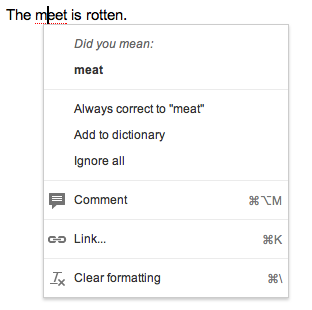
Google recently announce a new contextual spell check that will be built into Chrome shortly. Chrome is Googles free web browser. The spell checker will analyize the context so if you type "the meet is rotten" it will know that you were trying to say "the meat is rotten." This is a very nice addition to Googles products. Click read more or to see more pictures of the new spell check in action.


Thursday, October 2, 2014
Prizmo 2 0 for iOS Released With Cool New Features
 Prizmo 2.0 for iOS was just released in the App Store. Prizmo now works on the iPad as well as the iPhone and iPod Touch. The update includes many exciting new features. The original version of Prizmo included optical character recognition (OCR) but did not include the ability to scan documents to a PDF or text file. The PDF files are not just images but include searchable text. Prizmo 2.0 also allows users to export the documents to other apps.
To create a new document in Prizmo you can simply take a picture of multiple pages. Prizmo will automatically detect the edges of the page. In version 2.0 you no longer have to crop documents manually. Once you have captured all of the pages you can recognize the text of the document which is surprisingly fast and accurate. If the Prizmo does make a mistake you can edit the OCR zones or manually edit the text. After the text has been recognized you can email or export the document as a PDF or text document or read the text using built-in text-to-speech. The text is highlighted as it is read aloud which can be helpful for people with dyslexia Unfortunately you can only read one page of the document at a time using the built-in text-to-speech. In addition, it is important to note that each text-to-speech voice costs $2.99.
Prizmo is still a great tool for quickly reading printed documents using text-to-speech and now is one of the best PDF scanning apps. Most PDF scanning apps such as Scanner Pro only make an image PDF with no text but Prizmo creates PDFs with searchable text.
Prizmo 2.0 includes a new feature to help blind and visually impaired users line-up a document. Because it would be virtually impossible for the blind to take a well aligned picture of a document with out assistance Prizmo voices directions through VoiceOver. If a user has VoiceOver turned on it will tell a blind or visually impaired user which direction to move their device in order to get the perfect shot.
Prizmo is on sale fo $5.99 in the App Store. Click read more below to view screenshots of Prizmo 2.0.


Monday, September 29, 2014
New in iOS 7 Redeem iTunes Gift Cards with the Camera
.PNG "Redeem gift card with camera screen in iOS 7")
Subscribe to:
Posts (Atom)