Showing posts with label app. Show all posts
Showing posts with label app. Show all posts
Saturday, October 25, 2014
Free Bookshare App For Android

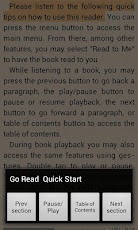
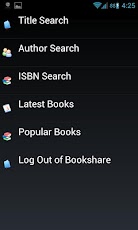
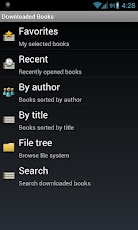
Bookshare recently released Go Read for Android devices. Go Read is the Android version of Bookshares app for iOS call Read2Go. The app is free and compatible with a number of Android 2.2 or higher phones and tablets. Features include direct access to Bookshares library of accessible books, text-to-speech with synced sentence by sentence highlighting and the ability to read ePub books. To learn more about how to become a Bookshare member click here. To download Go Read click here. Click read more below to view screen shoots of Go Read in action.

Friday, October 24, 2014
PDF Expert 5 Well Designed PDF Management App with Text to Speech
 PDF Expert 5 is a well designed PDF management app for the iPad. The app includes many useful features that allow you to read, edit, and annotate PDF documents easily. Unlike some other feature -rich apps, PDF Expert 5 does not feel cultured. The elegant design makes the app easy to use. PDF Expert is an assistive app because of its text-to-speech integration with the added benefit of extra features.
One caveat, while the app is good for non-disabled and dyslexic users, I would not recommend the app for VoiceOver users because of some VoiceOver problems I have found. Readdle, the maker of the app, should work on fixing these VoiceOver problems so blind and visually impaired can also benefit from the app.
PDF files can be imported from numerous cloud storage services including Google Drive, Drop Box and SkyDrive or using the "open-in" feature of many other iOS apps. You can also view other file types, but the built in text-to-speech reader is only available for PDF documents. Files can be organized into folders or dragged and dropped into different sections.
PDF Experts text-to-speech function works with any PDF with digital text. It does not work with PDF documents that have text within images. To read a compatible PDF, turn on text-to-speech in the reading mode menu and then press play. You can start reading at the middle or end of a page by highlighting a word and pressing "read from here." Text is read with the default iOS voice that many may recognize as the voice of Siri. Unfortunately, you cannot purchase additional higher quality voices. The app also requires you to re-enable text-to-speech every time you switch PDF documents. This is inconvenient if you switch are between PDF documents quickly.
Click read more below to continue reading about PDF Expert.
Viewing a PDF document is also a breeze. PDF Expert includes a quick scrolling mode and thumb nail view to allow you to easily navigate large PDFs. You can also change the background to sepia or night for easier viewing.


Aside from the text-to-speech features PDF Expert includes a number of editing and annotation features. Annotation options include highlighting, underlining, shapes, strike-through, stamps, signatures, and text. These annotation options are intuitive to use and you can easily can the color of highlights and other annotations. If you would like to add text to a PDF document you do not need to worry about overlapping any original text because the app automatically wraps your text so it will not overlap. Unfortunately, the app will not read your text annotations back to you using the built in reader, but you can always use the built in Speak Selection feature.
PDF Expert also includes a review mode which allows you to edit and markup existing PDF documents. To learn more about this feature see the below video.
With PDF Experts easy to use annotation and editing features and its built in text-to-speech reader PDF Reader is an ideal app for any iPad user who wants increase productivity. PDF Expert 5 is compatible with iPads running iOS 6 or higher and is available for $9.99 in the App Store.


Sunday, October 19, 2014
Learning Ally Audio App Updated

Today, Learning Ally (formally RFB&D) released a substantial upgrade to their iOS app. Learning Ally Audio is available for $19.99 on the iTunes app store. The app allows Learning Ally members to download audio books directly to their iPod Touch, iPhone or iPad. If you are unfamiliar with Learning Ally click here. To be eligible you must have a qualifying disability. To learn about becoming a member click here. Downloading an audio book is simple and involves transferring the audio file to the app via iTunes. Once youve downloaded a book you can listen to it on the go with your iOS device. The app allows users to navigate the audio book by section or page number, bookmark important sections and speed up the speaking rate. The new update includes new features that make listening easier. One of the new features is the ability to jump to any page in the book. Another handy new feature allows playback to continue even when the screen is locked. Yet another new feature remembers where in the book you left off and starts playing from that point the next time you open the app. The Learning Ally Audio app is a must have for reading Learning Ally audio books on the go.
Learning Ally also announced in a press release that this fall they will support text as well as human narration. Learning Ally’s President and CEO, Andrew Friedman said,
"Looking ahead, the Learning Ally Audio app will include text to speech functionality, enabling learners to enjoy the best of both worlds: human narration as well as text content of their books and reading materials."Click read more below to see screen shots of the updated app.


Sunday, October 5, 2014
Eyes Free Typing App Fleksy Coming to Android With One Major Advantage Over iOS Version
Fleksy the eyes-free typing app that originally debuted for iOS is now available in beta for Android. Fleksy uses gestures and text prediction to allow users to type without looking a the screen. Fleksy can be extremely helpful for the blind and visually impaired and can dramatically increase typing speed people who cannot see the screen. Unlike the iOS version the Android version can replace the default keyboard and be used with any app. In iOS you cannot use Fleksy in an email app or with the messages app but on Android you can. Besides integration with Android apps the Android version will be similar to the iOS version. Android users can try the Fleksy by visiting the Fleksy Beta Google+ page.

Click read more below to view a video about Fleksy.
Saturday, October 4, 2014
Ariadne GPS App Review
 Ariadne GPS is an app for iPhone, iPad and iPod Touch that allows people with visual impairments to navigate their surroundings. Ariadne GPS app is best suited for the iPad and cellular iPad because those devices have the most accurate location information. The app is fully compatible with VoiceOver allowing visually impaired users to use all features of the app. Ariadne GPS helps the user explore their surroundings by using the GPS of your iOS device to convey information about location, direction of travel and nearest favorite locations. The app can enable blind users to navigate streets, transit systems and even large buildings. When traveling on a train or a bus a blind user could set Ariadne GPS to alert them when they were getting close to their stop. A blind user could also program there classroom locations into the app in order to help navigate a large school building. As a user walks with the app can read street names and numbers. iAriadne GPS also has a map mode which allows a visually impaired user to access maps with VoiceOver.
Ariadne GPS is made to integrate perfectly with VoiceOver. It is a really well thought out app that solves a complex problem. United States users may find some of the labeling odd because the app is was designed over seas. For example street addresses are spoken with the street name and then the number and city.
Overall the $5.99 Aridane GPS is defiantly worth checking out. Click here to view it in the app store. Click read more below to view screenshots and videos of Ariadne GPS.


App was provided complimentary to reviewer
Sunday, September 28, 2014
Nook App for iOS Updated to Support VoiceOver and Zoom

Great news, the Nook app for iPhone, iPad, and iPod Touch is now accessible to the blind, visually impaired and people with print disabilities. The updated app now supports VoiceOver and Zoom. VoiceOver and Zoom are built in accessibility features in iOS. To learn more about VoiceOver click here. With VoiceOver you can have the book read aloud using text-to-speech. Oddly enough the update makes the Nook app more accessible than current Nooks. Serious kudos to Barns & Nobles for making their app accessible. To download the app for free click here.
Click read more below to view more screenshots.


Saturday, September 27, 2014
Kindle App for iOS and Android Adds Whispersync for Voice

 Amazons Kindle app for iOS and Android was recently updated to integrate audio books from Audible. The update, which is available for free, allows users to seamlessly switch between reading the Kindle text version of a book to listening to the Audible audio version of a book. For example, if you read part of the book and then switch to the audio version the recording will pickup right where you left off. The new feature even allows users to listen to the audio book while following along with the text version. Audio speaking rate can be increased or decreased according to user preference. Unfortunately, unlike Immersion Reading on Kindle Fire tablets, the Kindle app for iOS and Android does not highlight the text as it is being read allowed. While this may not be an inconveniences for some users, it could be a major omission for users with tracking difficulty. For now, users will need a Kindle Fire tablet to take advantage of the full Immersion Reading experience. To learn more about Immersion Reading click here. There is one another major caveat: price. In order to take advantage of Whispersync for Voice or Immersion Reading on a Kindle Fire, you must purchases both the Kindle and Audible versions of a book. This can become extremely expensive for the occasional reader let alone a book worm.
To download the app for iOS click here and to download the app for Android click here. To view screenshots of the app in action click read more below.


Subscribe to:
Posts (Atom)