Showing posts with label amazon. Show all posts
Showing posts with label amazon. Show all posts
Monday, September 29, 2014
Disabling Amazon shopping results in Ubuntu 12 10 Dash
If you use Dash, the internal search tool in Ubuntu 12.10, to find and display a file, folder, or application, Dash also displays Amazon shopping results(as "More suggestions"). For example, as shown in Figure 1 below, if you search for Python in Dash, it displays not only the IDLE (using Python-3.3) application, but also Amazon shopping results. This document can help you easily disable Amazon shopping results, allowing your search to display only what it finds internally, as shown in Figure 2 below.
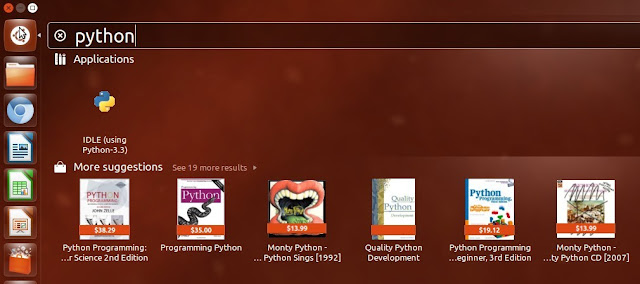 |
| Figure 1 - Amazon shopping results enabled |
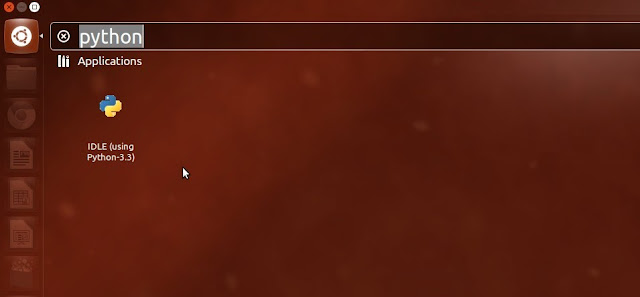 |
| Figure 2 - Amazon shopping results disabled |
Authors Note:Amazon shopping results in Dash annoy me. If I am searching for something on my computer, I want only that item; I care not whether Amazon (or any other merchant) can sell me related items. I need not be distracted by eye clutter. If I wish to buy something online, I will search for it through a browser.
You can very easily disable Amazon shopping results, as follows:
- As shown in Figure 3 below, in the launcher, click System Settings to display its window.
- As shown in Figure 4 below, click Privacy to display its window.
- As shown in Figure 5 below, find the switch at the right of When searching in the Dash: Include online search results, and then click the switch to toggle it to OFF.
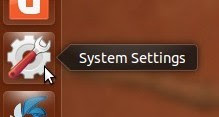 |
| Figure 3 - Selecting system settings |
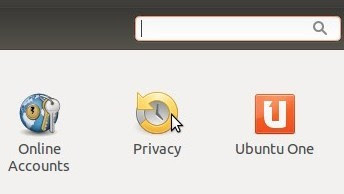 |
| Figure 4 - Selecting privacy |
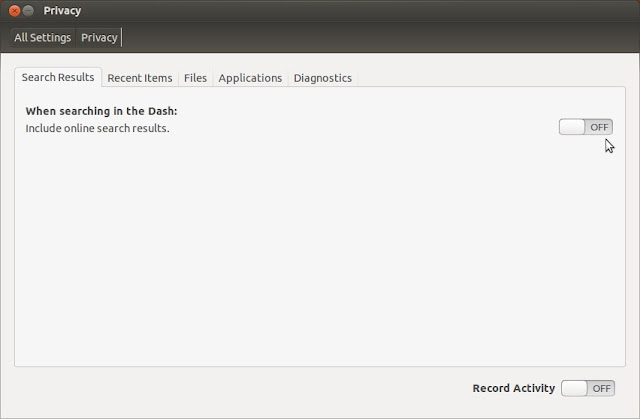 |
| Figure 5 - Disabling Amazon shopping results |

Subscribe to:
Posts (Atom)